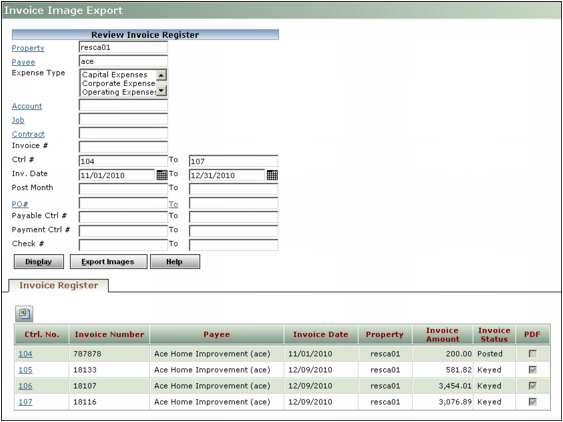
Exporting Invoice Images You can provide tenants, lenders, or auditors with a PDF file containing the invoice images that backup a financial transaction, billing, or report. This is sometimes referred to as a CAM Pack. To export invoice images 1 On the side menu, select Reports > Invoice Image Export. The Invoice Image Export screen appears. 2 Complete the filter. For more information, see “Invoice Image Export Filter”. 3 Click Display. 4 Click Export Images to export the images attached to the listed invoice registers into a PDF file. Invoice Image Export Filter Ctrl. No. Click this link to review invoice registers and the attached invoice images. PDF If there is no check mark, no invoice image is attached to this invoice register. If there is a check mark, an invoice image is attached and will be included in the PDF file.